Author: Karthi S
In RHEL systems, administrators can regain access by editing GRUB boot options and booting into a shell to reset the root password. RHEL 9 changes mean init=/bin/bash is often the more straightforward method compared to rd.break.
Updated RHEL 9 password reset process
- Press
eto edit GRUB. - Change
rotorwin thelinuxline. - Append
init=/bin/bash. - Press
Ctrl+xto boot. - Run
passwdto reset the password. - Run
touch /.autorelabel. - Run
exec /sbin/init.
Step-by-step screenshots
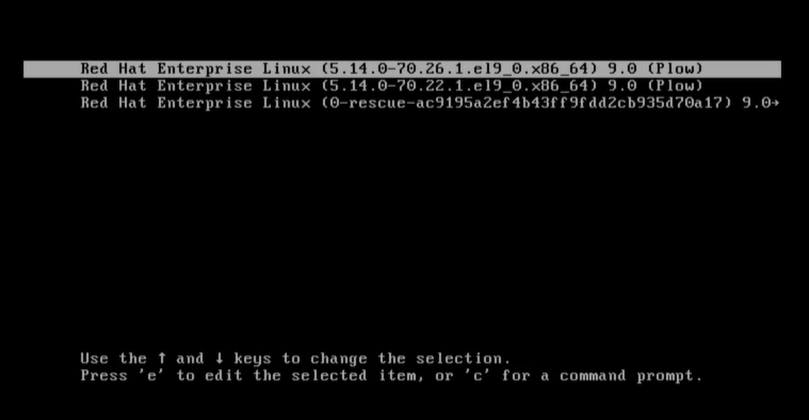
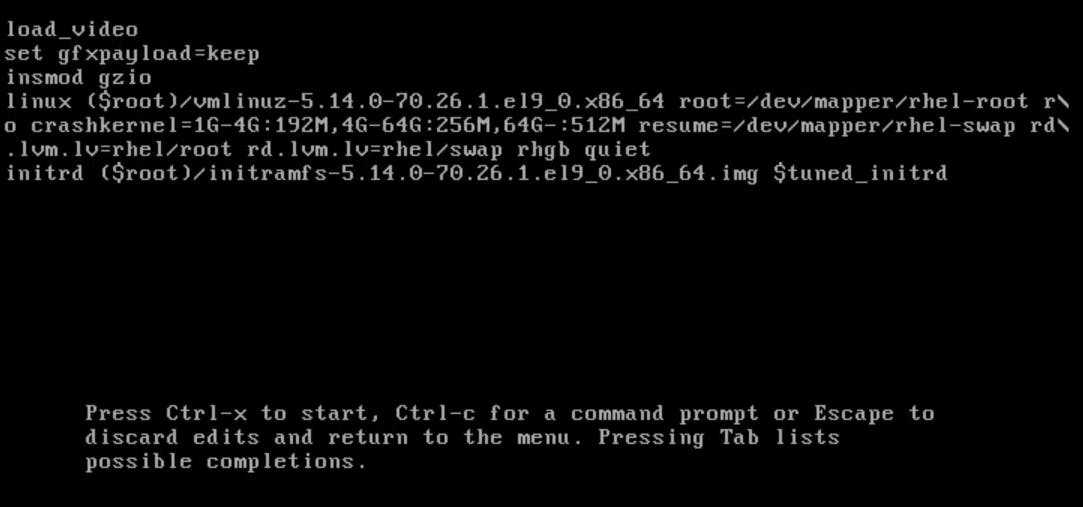


Method A (init=/bin/bash)
- Grub →
e init=/bin/bash(removerhgbandquietif necessary) →Ctrl+x/usr/sbin/load_policy -imount -o remount,rw /passwd rootmount -o remount,ro /
Method B (rd.break)
- Grub →
e rd.break→Ctrl+xmount -o remount,rw /sysroot/chroot /sysroot/passwd roottouch /.autorelabel
These steps align with modern RHEL 9 boot and SELinux behavior.