Author: Karthi S
An alias is a shortcut for a command or a series of commands. It helps reduce typing, makes commands easier to remember, and adds default options to common operations.
Prerequisites
- Access to the command line
- A Linux distribution
- An account with sudo privileges
Basic usage
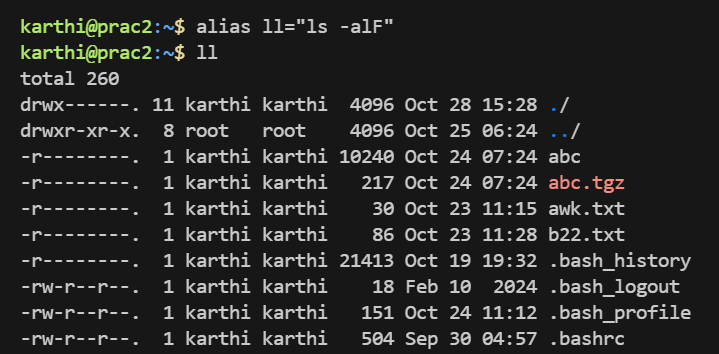
alias alias_name="command_to_run"
Example:
alias ll="ls -alF"
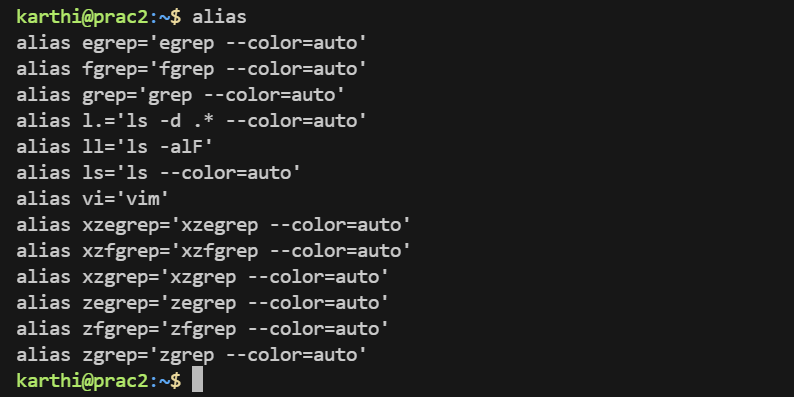
Viewing defined aliases
alias
alias ll
Removing an alias
unalias ll
Making aliases permanent
Add them to ~/.bashrc and reload:
echo 'alias ll="ls -alF"' >> ~/.bashrc
source ~/.bashrc
Example aliases
alias l="ls -CF"
alias la="ls -A"
alias ll="ls -alF"
alias update="sudo apt update && sudo apt upgrade"
alias rm="rm -i"
alias --help
alias --help
Aliases can be printed in reusable format with alias -p. A trailing space in an alias value causes the next word to be checked for alias substitution.
Happy simplification!